Car Icons SVG Bundle – 30 Automotive Icons
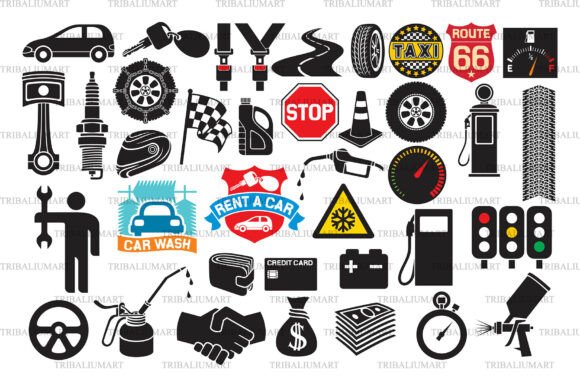
If you’re designing for cars—whether it’s a mechanic’s shop website, a racing blog, an educational infographic about vehicle maintenance, or a custom t-shirt line for auto enthusiasts—you need icons that are precise, scalable, and instantly recognizable. The Car Icons SVG Bundle – 30 Automotive delivers exactly that: a curated, cohesive set of 30 high-quality black vector icons built for real-world use—not just decoration.
These aren’t generic clipart or low-res placeholders. Each icon is hand-crafted as a clean, minimalist black vector—optimized for clarity at any size. From a detailed tire cross-section to a stylized fuel pump, from a classic wrench to a sleek racing flag, every symbol serves a functional purpose while holding visual weight. And because they’re delivered in SVG, EPS, PNG, JPEG, and PDF—all in one ZIP file—you’re never locked into a single format or workflow.
Why This Bundle Fits Real Creative Workflows
Designers and makers don’t just need icons—they need flexibility without friction. This bundle anticipates how people actually work:
- SVG files scale infinitely for web interfaces, dashboards, or responsive landing pages—no pixelation, no guesswork.
- EPS files integrate smoothly into Adobe Illustrator, CorelDRAW, or InDesign for print-ready layouts, brochures, or branded service manuals.
- PNGs with transparent backgrounds drop cleanly into Canva, PowerPoint, Google Slides, or social media graphics—ideal for educators explaining brake systems or marketers promoting seasonal oil-change specials.
- JPEGs offer quick compatibility for email newsletters, blog posts, or CMS uploads where vector support isn’t available.
- PDFs let you preview, annotate, or share the full set with clients or team members—even without design software.
Crucially, every format contains all 30 icons—not individual downloads scattered across folders. That means less time organizing files and more time building.
Creative Applications Across Audiences
Different users find different value in the same set—and that’s by design.
For Small Business Owners & Mechanics
A local garage can use the battery, oil can, and warning sign icons to build a clear, professional service menu—either printed on shop walls or embedded in a simple WordPress site. Pair the tire and wrench icons with short, plain-language explanations (“Tire Rotation: Every 6,000 miles”) and you’ve turned technical service into approachable communication.
For Educators & Trainers
Vocational instructors teaching automotive technology can assemble custom worksheets using the road sign, engine block, and traffic light icons—reinforcing concepts visually before students ever touch a real vehicle. These icons help bridge abstract theory and hands-on practice without overwhelming learners.
For Makers & Crafters
Cricut and Silhouette users rely on crisp, vector-based outlines for cutting precision. The black-on-transparent nature of these icons makes them ideal for vinyl decals, laser-engraved toolbox labels, or heat-transfer designs on mechanic uniforms. No need to trace or convert—just import and cut.
For Marketers & Bloggers
Racing event promoters, EV newsletter writers, or car detailing service owners can use the racing flag, charging port, or spray bottle icons to add visual rhythm to long-form content. Consistent icon use builds brand recognition over time—even in text-heavy posts about tire pressure standards or winter battery care.
Staying Clear, Consistent, and Audience-Friendly
Using icons well means more than dropping them into a layout. It means aligning them with your audience’s expectations and your project’s goals.
Start by asking: What action or idea does this icon need to support? A fuel pump icon works well next to “Find Nearby Stations” on a mobile app—but not as a standalone logo unless paired with strong typography and context. Likewise, the traffic cone or stop sign icons communicate urgency or caution—so reserve them for safety notices or error states, not general section headers.
For consistency, stick to one style across a project. Since all 30 icons share the same line weight, proportion, and negative space treatment, mixing them feels intentional—not haphazard. Avoid adding third-party icons mid-project unless they match this aesthetic; visual mismatch dilutes clarity.
When adapting for different platforms, test legibility early. An icon that reads clearly at 48px on a desktop dashboard may vanish at 24px on mobile. Use the SVG version and adjust stroke width or simplify details if needed—these vectors give you that control.
Practical Tips Before You Start
- Check your software: Ensure your design or cutting tool supports SVG or EPS import. Most modern apps do—but older versions of Paint.NET or basic photo editors may require PNG/JPEG instead.
- Respect licensing: This is a commercial-use bundle, but it’s for digital creation—not redistribution. You can use the icons in client work, merch, or presentations—but don’t resell the icons themselves as standalone assets.
- Think in layers: Many icons (like the battery or oil can) include subtle internal lines or texture hints. Use those layers selectively—turn off interior detail when scaling down, or isolate parts for animation or color experiments.
- Pair with type, not replace it: Icons clarify, but rarely explain alone. Always accompany them with concise, human-readable labels—especially for technical or safety-critical content.
The Car Icons SVG Bundle – 30 Automotive doesn’t promise magic—it offers reliability. It’s the kind of resource that disappears into your process, letting you focus on solving problems, communicating clearly, or launching something useful. Whether you’re sketching a wireframe, prepping a Cricut mat, or building a lesson plan, these icons meet you where you are—and give you room to go further.
No fluff. No filler. Just 30 thoughtful, production-ready symbols—ready to support the work you’re already doing, or the next idea you haven’t sketched yet.